Multilingual Text to Speech
Turn text to spoken audio by selecting a model based on the language of the text.
Requirements
- installed speeches service
- installed models specified in speeches service
Quickstart
Click Add custom model button in speeches service.
In model ID, write the name of your model e.g. my-model.
Set default model ID (this model will be used when there are no matching language model pairs).
Example model ID: speaches-ai/piper-en_US-ryan-medium
Set ISO 639-1 language codes and model IDs in next rows.
Supported languages codes:
af, ar, bg, bn, ca, cs, cy, da, de, el, en, es,
et, fa, fi, fr, gu, he, hi, hr, hu, id, it, ja,
kn, ko, lt, lv, mk, ml, mr, ne, nl, no, pa, pl,
pt, ro, ru, sk, sl, so, sq, sv, sw, ta, te, th,
tl, tr, uk, ur, vi, zh-cn, zh-tw
Example model ID: speaches-ai/piper-en_US-ryan-medium
Example Setup
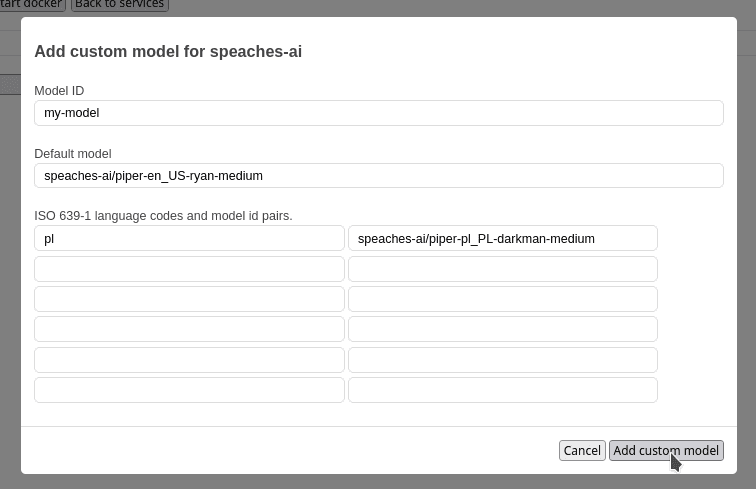
Example request in english language:
curl -X POST \
 "https://deepfellow-server-host/v1/audio/speech" \
  -H "Authorization: Bearer DEEPFELLOW-PROJECT-API-KEY" \
  -H "Content-Type: application/json" \
  -d '{
    "model": "my-model",
    "input": "Today is a wonderful day to build something people love!",
  }' \
  --output speech.mp3
from pathlib import Path
from openai import OpenAI
client = OpenAI(
base_url="https://deepfellow-server-host/v1",
api_key="DEEPFELLOW-PROJECT-API-KEY"
)
speech_file_path = Path(__file__).parent / "speech.mp3"
with client.audio.speech.with_streaming_response.create(
model="my-model",
input="Today is a wonderful day to build something people love!",
) as response:
response.stream_to_file(speech_file_path)import * as fs from 'fs';
import OpenAI from 'openai';
const client = new OpenAI({
baseURL: 'https://deepfellow-server-host/v1',
apiKey: 'DEEPFELLOW-PROJECT-API-KEY'
});
const response = await client.audio.speech.create({
model: 'my-model',
input: 'Today is a wonderful day to build something people love!',
});
const buffer = Buffer.from(await response.arrayBuffer());
await fs.promises.writeFile('speech.mp3', buffer);Example request in polish language:
curl -X POST \
 "https://deepfellow-server-host/v1/audio/speech" \
  -H "Authorization: Bearer DEEPFELLOW-PROJECT-API-KEY" \
  -H "Content-Type: application/json" \
  -d '{
    "model": "my-model",
    "input": "Dzisiaj jest wspaniały dzień na stworzenie czegoś, co ludzie kochają!",
  }' \
  --output speech.mp3
from pathlib import Path
from openai import OpenAI
client = OpenAI(
base_url="https://deepfellow-server-host/v1",
api_key="DEEPFELLOW-PROJECT-API-KEY"
)
speech_file_path = Path(__file__).parent / "speech.mp3"
with client.audio.speech.with_streaming_response.create(
model="my-model",
input="Dzisiaj jest wspaniały dzień na stworzenie czegoś, co ludzie kochają!",
) as response:
response.stream_to_file(speech_file_path)import * as fs from 'fs';
import OpenAI from 'openai';
const client = new OpenAI({
baseURL: 'https://deepfellow-server-host/v1',
apiKey: 'DEEPFELLOW-PROJECT-API-KEY'
});
const response = await client.audio.speech.create({
model: 'my-model',
input: 'Dzisiaj jest wspaniały dzień na stworzenie czegoś, co ludzie kochają!',
});
const buffer = Buffer.from(await response.arrayBuffer());
await fs.promises.writeFile('speech.mp3', buffer);We use cookies on our website. We use them to ensure proper functioning of the site and, if you agree, for purposes such as analytics, marketing, and targeting ads.