Architecture
DeepFellow Server
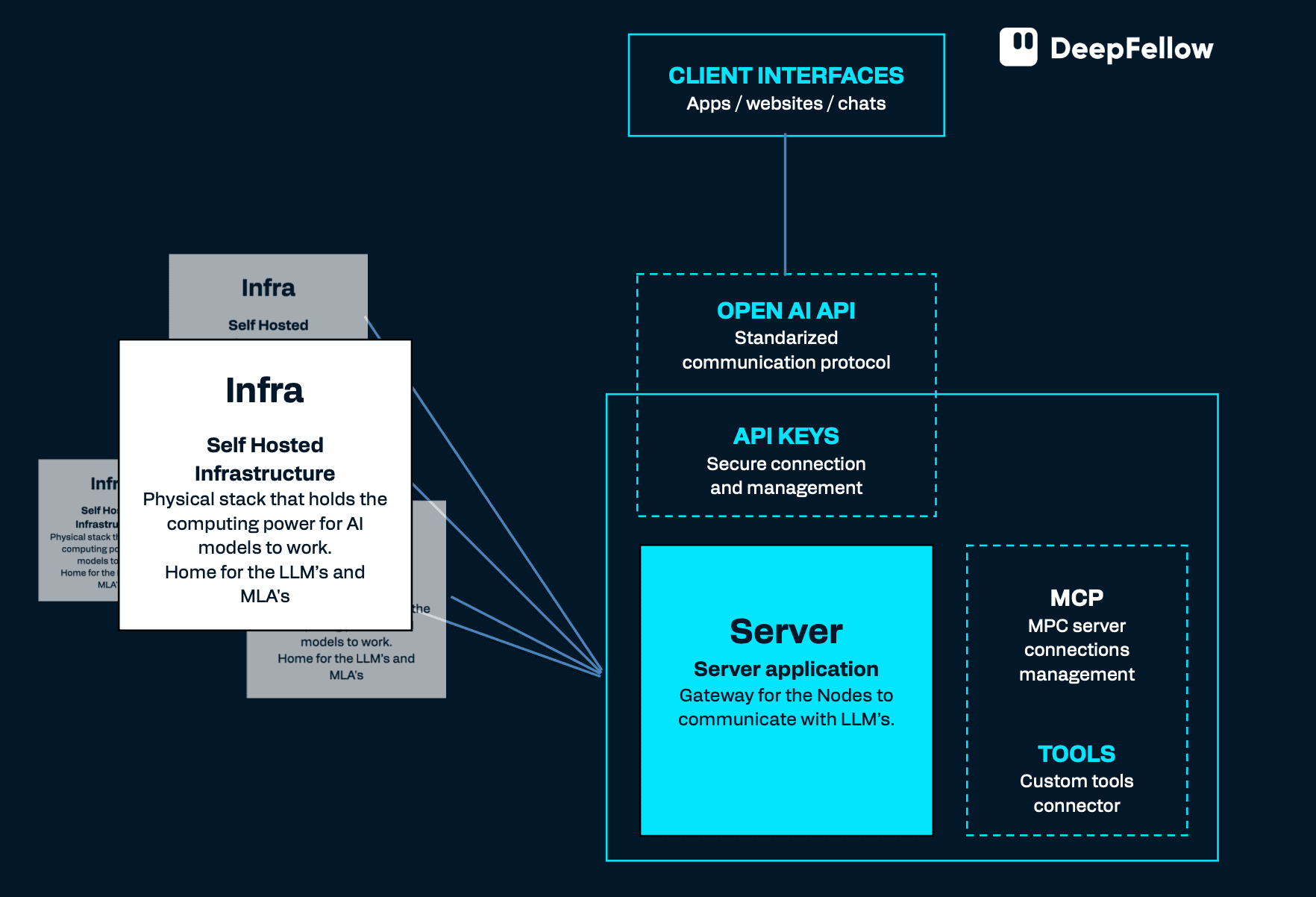
DeepFellow Server is the gateway to access MCP servers, Tools, DeepFellow Infra, Plugins, and Vector Data Base (VDB). It also provides authorization and administration layers to the system. It is also used for user and access management, business logic and all the other application-related operations.
Your DeepFellow Server should have at least 1 CPU and 2GB RAM.
DeepFellow Infra
DeepFellow Infra is a self-hosted infrastructure stack that holds the computing power for AI models to work. It hosts LLMs, embedding models, and other AI services such as rerankers, speech-to-text and text-to-speech models, and image-generation models. It also registers and hosts MCP servers.
Manage DeepFellow Infra through the Infra Web Panel.
Connecting Infras into a Mesh
Assume you want to connect two Infras in a parent-child relation.
-
Decide which of the two machines will be the parent and which will be the child.
-
On the parent Infra, reveal its
DF_MESH_KEYvalue by runningdeepfellow infra infowith the--secretflag. API keys are masked by default:
$ deepfellow infra info --secret    # on parent Infra

💡      Information about DeepFellow Infra:
        NAME: infra
        INFRA_URL: https://df-infra-node-1.com
        INFRA_MESH_URL: wss://df-infra-node-1.com
        INFRA_PORT: 8086
        INFRA_IMAGE: github.simplito.com:5050/df/deepfellow-infra:latest
        MESH_KEY: dfmesh_dbc8c1cf-c07a-4bba-bda1-d89829be37bb
        INFRA_API_KEY: dfinfra_c7a934fc-5e1f-41b2-b10e-57016c18d516
        INFRA_ADMIN_API_KEY: dfinfraadmin_99d7df55-107b-4327-aeef-54e187f6c5aa
        CONNECT_TO_MESH_URL: undefined
        CONNECT_TO_MESH_KEY: undefined
        INFRA_DOCKER_SUBNET: deepfellow-infra-net
        INFRA_COMPOSE_PREFIX: dfd834zh_
        INFRA_DOCKER_CONFIG: /home/mark/.docker/config.json
        INFRA_STORAGE_DIR: /home/mark/.deepfellow/infra/storage
        HUGGING_FACE_TOKEN: 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
        CIVITAI_TOKEN: 7fea22cc5605cf498066059415157828
The list of environmental variables for the parent Infra appears.
The values of DF_CONNECT_TO_MESH_KEY and DF_CONNECT_TO_MESH_URL are undefined. This means the parent Infra is not connected as a child to any other Infra.
- On the child Infra, verify that
DF_INFRA_URLis set to an address the parent can reach.
DF_INFRA_URL on the child must resolve from the parent's network. A local hostname such as http://infra:8086 works inside a Docker network but is unreachable from a parent on a different host (for example, one hosted on AWS). If the child is not publicly accessible, expose it through a public IP, a domain name, or a tunneling service such as ngrok, bore.pub, or localhost.run, then update the value:
deepfellow infra env set DF_INFRA_URL <var>PUBLIC_URL</var>- To connect the child Infra to the parent, type the following on the child:
deepfellow infra connect wss://df-infra-node-1.com dfmesh_dbc8c1cf-c07a-4bba-bda1-d89829be37bbThe child Infra calls the parent Infra with DF_MESH_KEY. If the parent Infra accepts the request, it connects the child Infra.
Once connected, the child Infra has its DF_CONNECT_TO_MESH_KEY and DF_CONNECT_TO_MESH_URL values set:
$ deepfellow infra info --secret    # on child Infra
💡      Information about DeepFellow Infra:
        NAME: infra
        INFRA_URL: https://df-infra-node-2.com
        INFRA_MESH_URL: wss://df-infra-node-2.com
        INFRA_PORT: 8086
        INFRA_IMAGE: github.simplito.com:5050/df/deepfellow-infra:latest
        MESH_KEY: dfmesh_05f1b75e-9951-4dda-88b3-2868646d26c7
        INFRA_API_KEY: dfinfra_c7a934fc-5e1f-41b2-b10e-57016c18d516
        INFRA_ADMIN_API_KEY: dfinfraadmin_99d7df55-107b-4327-aeef-54e187f6c5aa
        CONNECT_TO_MESH_KEY: dfmesh_dbc8c1cf-c07a-4bba-bda1-d89829be37bb
        CONNECT_TO_MESH_URL: https://df-infra-node-1.com
        INFRA_DOCKER_SUBNET: deepfellow-infra-net
        INFRA_COMPOSE_PREFIX: dfd834zh_
        INFRA_DOCKER_CONFIG: /home/helen/.docker/config.json
        INFRA_STORAGE_DIR: /home/helen/.deepfellow/infra/storage
        HUGGING_FACE_TOKEN: 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
        CIVITAI_TOKEN: 7fea22cc5605cf498066059415157828
This means the child Infra is connected as a child to another Infra located at https://df-infra-node-1.com.
Once connected, models flow in both directions. The child's models become available for the parent to route requests to. The parent's own models also become available to the child, together with any models exposed by ancestors further up the Mesh. This happens right away on connect, and stays live as those models change.
To stop a node from exposing models to its children, turn off DF_SHARE_MODELS_DOWNSTREAM on that node from the Infra Web Panel's Configuration page. Its children then see neither that node's own models nor those of any ancestor above it. The node still connects, and continues sharing its own models upward as usual.
Repeat the process to extend the Mesh with as many Infras as you want.
To disconnect the child Infra and its descendants from the parent Infra, type the following on the child Infra:
deepfellow infra disconnectRequest Routing Between Instances
When you register the same model on multiple instances, either locally or across a Mesh, DeepFellow Infra picks which instance serves each request automatically.
DeepFellow Infra ranks candidate instances by two signals:
- Warmth: An instance with the model already loaded in memory ranks above one that needs to load it first.
- Capacity: Among equally warm instances, the one that handles more concurrent requests ranks first. Capacity comes from each backend's own concurrency setting (
num_parallelfor Ollama and llama.cpp) or, for vLLM and SGLang, from the concurrency each computes at startup from the available GPU memory.
DeepFellow Infra sends new requests to the top-ranked instance until it nears its capacity, then moves to the next-ranked instance. This packs traffic onto the fewest, largest, already-warm instances instead of spreading it evenly, so you get better use of your hardware.
An instance registered over a mesh connection reserves a small margin of its capacity, around 10%, to cover the delay in propagating usage information across the Mesh. A local instance uses its full capacity.
Example Infra Specification and Cost
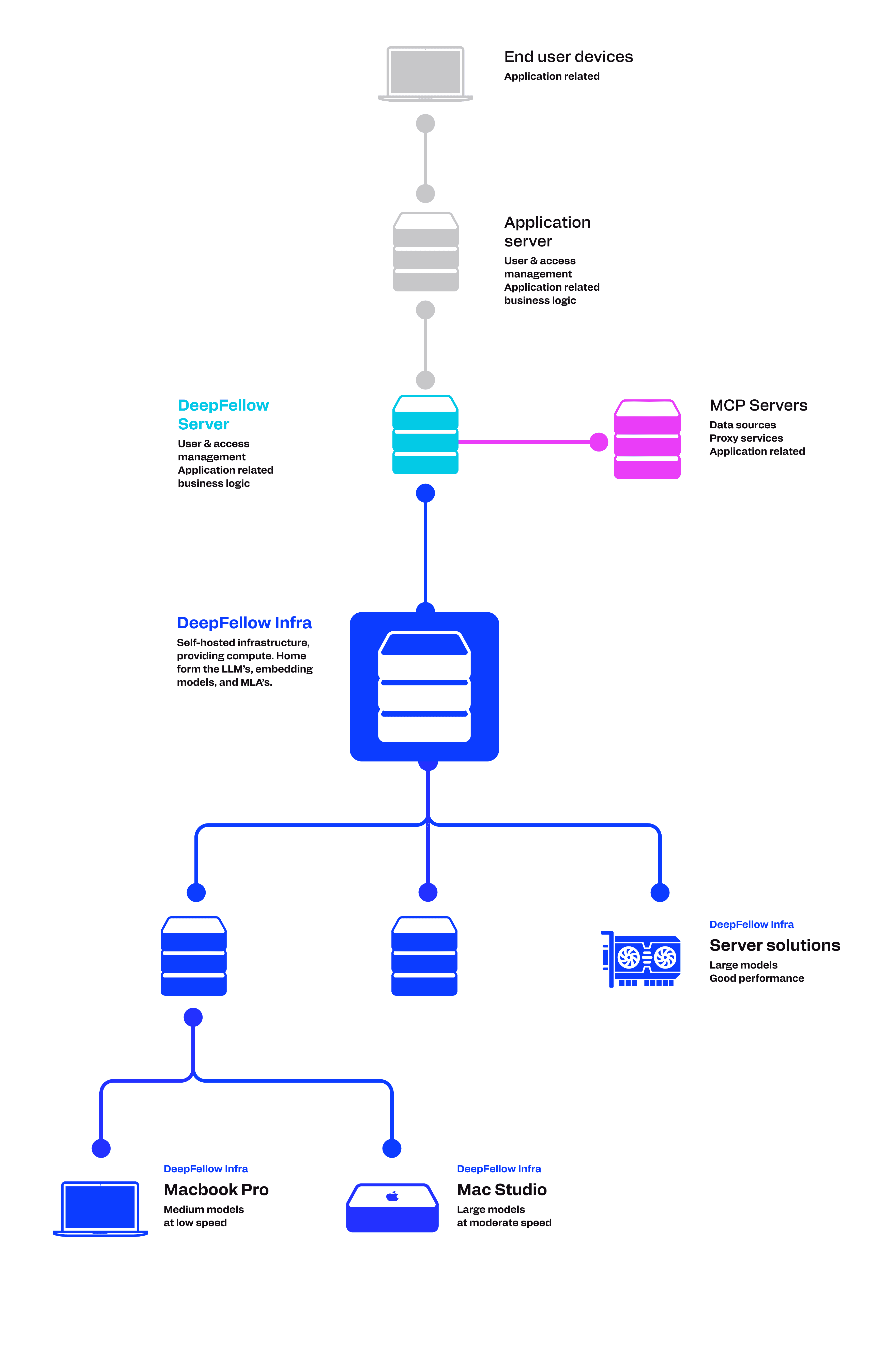
DeepFellow Infra runs on self-hosted hardware or on a cloud GPU instance. Connect multiple Infra nodes into a Mesh to go from a single GPU to a multi-node Mesh.

1. Server Solutions: Large models, good performance
- 160GB VRAM, 256GB RAM
- 8×4000 ADA 20GB, Intel Xenon
Estimated cost:
- base: 3 000-16 000 USD
- graphic cards: 2 000-60 000 USD

2. PC Workstation: Small and medium models at large speed
- 32-128GB RAM
- 2×Nvidia GPU
Estimated cost:
- base: 1 000-3 000 USD
- consumer graphic cards: 1 000-6 000 USD

3. Mac Studio: Large models at moderate speed
- 35-512GB RAM
- 14-32 CPU, 32-80 GPU, 16-32 Neural
Estimated cost:
- base: 3 000-25 000 USD

4. MacBook Pro: Medium models at low speed
- 36-128GB RAM
- 14-16 CPU, 32-40 GPU, 16 Neural
Estimated cost:
- base: 2 000-10 000 USD
We use cookies on our website. We use them to ensure proper functioning of the site and, if you agree, for purposes such as analytics, marketing, and targeting ads.