Authorization
How organizations, projects, users, and API keys relate, and what each credential type can access.
Projects provide a powerful way to organize, manage, and monitor your work.
- Organize Workflows: Create separate environments for different teams, tasks, or clients to keep your work structured.
- Monitor Consumption: Track the usage of specific resources (models, vector databases, file storage, etc.) within the scope of each project.
- Govern Access and Resources: Manage access permissions, enforce usage limits, and provision models on a per-project basis.
What organizations and projects represent can vary in each case. The most common solution would be for organization to be a company and project – its division.
DeepFellow Server uses three credential types to authorize API requests: admin / user tokens (dfuser_), organization API keys (dforg_), and project API keys (dfproj_). Each type scopes access to a different level of the hierarchy.
Hierarchy
Every entity in DeepFellow Server belongs to one level of this hierarchy:
User (is_admin = true)          top-level admin; manages users and organizations
  └─ Organization               owned by one user (owner_id)
       └─ Project               belongs to one organization (organization_id)
            └─ Project API key  belongs to one project (project_id)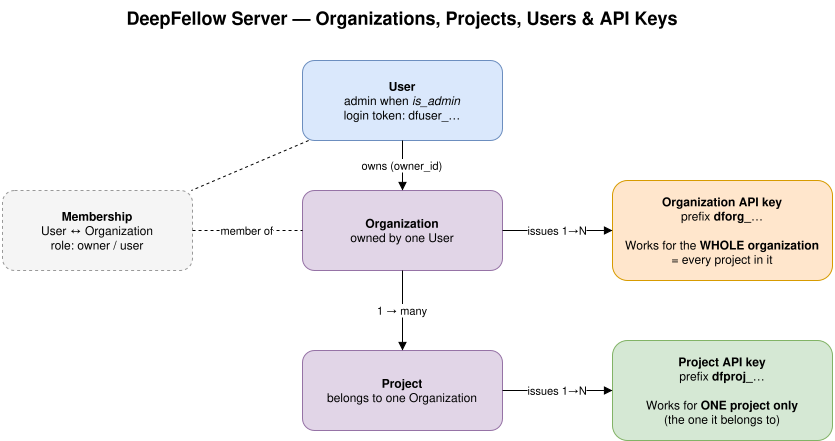
Key point: an Organization key (dforg_) authorizes every project in the organization. A Project key (dfproj_) authorizes only its own project. Don't mix them up.
A user can be a member of more than one organization. A user with is_admin = true can act on any organization or project.
Credential Types
Three credential types authenticate requests to the API:
| Credential | Prefix | Scope | Stored in |
|---|---|---|---|
| Admin / user token | dfuser_ | All organizations and projects for admins; the user's own organizations and projects for regular users | tokens |
| Organization API key | dforg_ | One organization and all of its projects | organization_api_keys |
| Project API key | dfproj_ | One project | api_keys |
Send any credential as a bearer token:
Authorization: Bearer CREDENTIALKey values are hashed with SHA-256 before storage. The plaintext is returned only once, at creation.
- To create an organization key, call
POST /v1/organization/admin_api_keys. - To create a project key, call
POST /v1/organization/projects/<var>PROJECT_ID</var>/api_keys. - User tokens come from
/auth/login. To create the first admin user, rundeepfellow server create-admin.
Access Matrix
Each credential reaches a different set of API groups:
Admin API /admin/* | Organization API /v1/organization/* | Project API /v1/* | |
|---|---|---|---|
Admin token (dfuser_) | yes | yes | yes |
Organization key (dforg_) | no | own organization | own organization's projects |
Project key (dfproj_) | no | no | own project |
- Admin API — manages users and organizations. Requires an admin token (
is_admin = true). - Organization API — management endpoints under
/v1/organizationthat act on one organization, such as/v1/organization/projects,/v1/organization/users, and/v1/organization/admin_api_keys. An organization key works for its own organization; a project key cannot reach this group. - Project API — the client-facing
/v1group that applications call. These are the OpenAI-compatible endpoints such as/v1/chat/completions,/v1/models, and/v1/embeddings. All three credentials work here.
In short: an organization key (dforg_) authorizes every project in the organization. A project key (dfproj_) authorizes only the one project it belongs to.
Identifying the Project
When calling the Project API (/v1/*), the server needs to know which project to authorize the request against.
- Project key (
dfproj_) — the project is implicit in the key. No header required. - Organization key (
dforg_) — pass theOpenAI-Projectheader with the globally unique project id. - Admin / user token (
dfuser_) — pass theOpenAI-Projectheader with the project id, and optionally theOpenAI-Organizationheader with the organization id (required when the organization differs from the user's default).
The OpenAI-Organization header never identifies the project by itself. It selects or validates the organization. The request is rejected if the project named in OpenAI-Project does not belong to the selected organization.
When calling the Organization API (/v1/organization/*):
- Organization key — the organization is implicit in the key. No header required.
- Admin / user token — pass the
OpenAI-Organizationheader, unless the organization is the user's default.
Examples
The following examples all reach the same project (proj_abc in organization org_xyz).
Project key — project is implicit in the key:
curl https://deepfellow-server-host/v1/models \
  -H "Authorization: Bearer dfproj_..."
Organization key — name the project:
curl https://deepfellow-server-host/v1/models \
  -H "Authorization: Bearer dforg_..." \
  -H "OpenAI-Project: proj_abc"
Admin / user token — name both the organization and the project:
curl https://deepfellow-server-host/v1/models \
  -H "Authorization: Bearer dfuser_..." \
  -H "OpenAI-Organization: org_xyz" \
  -H "OpenAI-Project: proj_abc"
The following examples call the Organization API to list projects. A project key cannot reach this endpoint.
Organization key — organization is implicit in the key:
curl https://deepfellow-server-host/v1/organization/projects \
  -H "Authorization: Bearer dforg_..."
Admin / user token — name the organization:
curl https://deepfellow-server-host/v1/organization/projects \
  -H "Authorization: Bearer dfuser_..." \
  -H "OpenAI-Organization: org_xyz"
Logging in
You can use DeepFellow Server Web Panel to perform this action.
Using DeepFellow Client
As the Admin:
$ deepfellow server login
❓      Provide your email: admin@example.com
❓      Provide your password:
💡      Updated /home/johndoe/.deepfellow/secrets.
💡      Your token is stored and will be used automatically.
Programmatically
curl -X 'POST' \
    'https://deepfellow-server-host/auth/login' \
    -H 'Content-Type: application/json' \
    -d '{
        "email": "admin@example.com",
        "password": "admin123"
    }'
import requests
response = requests.post(
'https://deepfellow-server-host/auth/login',
json={
"email": "admin@example.com",
"password": "admin123"
},
headers={
"Content-Type": "application/json"
}
)
data = response.json()
print(data)const response = await fetch('https://deepfellow-server-host/auth/login', {
method: 'POST',
headers: {
'Content-Type': 'application/json'
},
body: JSON.stringify({
email: 'admin@example.com',
password: 'admin123'
})
});
const data = await response.json();
console.log(data);Response:
{
    "access_token": "dfuser_171e04d3-e0b7-4ff2-9a05-a856aaec71ff",
    "refresh_token": "dfuserrefresh_34fd8fbe-d8ac-4fdd-9ce5-2258c021e362",
    "token_type": "bearer",
    "access_expires_at": 1791968521,
    "refresh_expires_at": 1794474121
}
Resetting a Password
To reset the password for a DeepFellow Server account, run:
$ deepfellow server password-reset
❓      Provide user email: admin@simplito.com
❓      Provide user password:
✅      Password changed.
Enter the email address you provided when you created the admin account. If the system recognizes the email, it changes the password.
A user can also reset their own forgotten password from the Web Panel. See Resetting a Forgotten Password.
Create an Organization
You can use DeepFellow Server Web Panel to create organizations.
To create an organization, you have to be authorized as an Admin. Get your Admin Key from /auth/login or login using the deepfellow command. In the code samples the token is called DEEPFELLOW-ADMIN-API-KEY.
DeepFellow CLI
$ deepfellow server organization create Simplito
💡      Created Organization "Simplito"
      ID: ccafeb97f6e64467b6ef3be739bbb04f.
Programmatically
curl -X 'POST' \
   'https://deepfellow-server-host/admin/organization/' \
   -H 'Authorization: Bearer DEEPFELLOW-ADMIN-API-KEY' \
   -H 'Content-Type: application/json' \
   -d '{
       "name": "Simplito"
   }'
import requests
response = requests.post(
"https://deepfellow-server-host/admin/organization/",
json={"name": "Simplito"},
headers={
'Content-Type': 'application/json',
"Authorization": "Bearer DEEPFELOW-ADMIN-API-KEY",
},
)
data = response.json()
print(data)const response = await fetch('https://deepfellow-server-host/admin/organization/', {
method: 'POST',
headers: {
'Content-Type': 'application/json',
Authorization: 'Bearer DEEPFELLOW-ADMIN-API-KEY'
},
body: JSON.stringify({
name: 'Simplito'
})
});
const data = await response.json();
console.log(data);Response:
{
    "organization": {
        "id": "68ee171ecb8b28e462882959",
        "created_at": 1760433950,
        "name": "Simplito",
        "owner_id": "68ecef07ec79da701ccf2407"
    }
}
Create an Organization API Key
You can use DeepFellow Server Web Panel to create an Organization API Key.
Your Organization API Key can be used to make API requests on projects within the organization. You must use your Admin API Key to create Organization API Key.
DeepFellow CLI
$ deepfellow server organization api-key create ORGANIZATION-ID "Simplito Organization Key"
💡      name: "Simplito Organization Key"
        redacted_value: dforg..................................2b6
        id: 6a43cd88a916948910838057
        created_at: 2026-06-30 16:07:04+02:00
        last_used_at: 2026-06-30 16:07:04+02:00
        owner-name: admin@example.com
        owner-id: 6a3d129b243df9436309025e
        value: dforg_080d2ffa-2d2f-450b-8107-e536cf4622b6
Programmatically
curl -X 'POST' \
    'https://deepfellow-server-host/v1/organization/admin_api_keys' \
    -H 'OpenAI-Organization: ORGANIZATION-ID' \
    -H 'Authorization: Bearer DEEPFELOW-ADMIN-API-KEY' \
    -H 'Content-Type: application/json' \
    -d '{
        "name": "Simplito Organization Key"
    }'
import requests
url = "https://deepfellow-server-host/v1/organization/admin_api_keys"
headers = {
"OpenAI-Organization": "ORGANIZATION-ID",
"Authorization": "Bearer DEEPFELOW-ADMIN-API-KEY",
"Content-Type": "application/json",
}
data = {"name": "Simplito Organization Key"}
response = requests.post(url, headers=headers, json=data)
response_data = response.json()
print(response_data)const response = await fetch('https://deepfellow-server-host/v1/organization/admin_api_keys', {
method: 'POST',
headers: {
Authorization: 'Bearer DEEPFELOW-ADMIN-API-KEY',
'OpenAI-Organization': 'ORGANIZATION-ID',
'Content-Type': 'application/json'
},
body: JSON.stringify({
name: 'Simplito Organization Key'
})
});
const data = await response.json();
console.log(data);Response:
{
    "id": "ORGANIZATION-ID",
    "object": "organization.admin_api_key",
    "name": "Simplito Organization Key",
    "redacted_value": "dforg..................................592",
    "owner": {
        "created_at": 1760358151,
        "id": "68ecef07ec79da701ccf2407",
        "name": "admin@example.com",
        "object": "organization.user",
        "role": "owner",
        "type": "user"
    },
    "created_at": 1760360660,
    "last_used_at": 1760360660,
    "value": "dforg_d27bf073-14d8-4c1a-83b5-93ee7ac11592"
}
Create a Project
You can use DeepFellow Server Web Panel to create a project.
Projects are created within an organization. They might represent a company division e.g. Human Resources or Accounting. Creating a project requires an Organization API Key. You can also use the Admin API Key, but then you also need to provide organization ID using the OpenAI-Organization header.
DeepFellow CLI
The organization ID is the first positional argument and the project name the second. Use --models and --custom-endpoints to restrict the models and custom endpoints the project can use; both default to allowing all.
$ deepfellow server project create ORGANIZATION-ID "Human Resources"
💡      name: Human Resources
        id: 6a43cf67a916948910838059
        status: active
        created_at: 2026-06-30 16:15:03+02:00
        models: all
        custom_endpoints: []
        mcp_prefixes: all
Programmatically
The examples use an Admin API Key. To use Organization API Key, just replace the Authorization token with the Organization API Key (then, OpenAI-Organization header is optional).
curl -X 'POST' \
    'https://deepfellow-server-host/v1/organization/projects' \
    -H 'OpenAI-Organization: ORGANIZATION-ID' \
    -H 'Authorization: Bearer DEEPFELLOW-ADMIN-API-KEY' \
    -H 'Content-Type: application/json' \
    -d '{
        "name": "Human Resources",
        "status": "active",
        "models": [
            "llama3.1:8b",
            "qwen3:latest"
        ],
        "custom_endpoints": [
            "/v1/ocr",
            "/summarize"
        ]
    }'
import requests
url = "https://deepfellow-server-host/v1/organization/projects"
headers = {
"OpenAI-Organization": "ORGANIZATION-ID",
"Authorization": "Bearer DEEPFELOW-ADMIN-API-KEY",
"Content-Type": "application/json",
}
data = {
"name": "Human Resources",
"status": "active",
"models": ["llama3.1:8b", "qwen3:latest"],
"custom_endpoints": ["/v1/ocr", "/summarize"],
}
response = requests.post(url, headers=headers, json=data)
response_data = response.json()
print(response_data)const response = await fetch('https://deepfellow-server-host/v1/organization/projects', {
method: 'POST',
headers: {
'OpenAI-Organization': 'ORGANIZATION-ID',
Authorization: 'Bearer DEEPFELOW-ADMIN-API-KEY',
'Content-Type': 'application/json'
},
body: JSON.stringify({
name: 'Human Resources',
status: 'active',
models: ['llama3.1:8b', 'qwen3:latest'],
custom_endpoints: ['/v1/ocr', '/summarize']
})
});
const data = await response.json();
console.log(data);Response:
{
    "name": "Human Resources",
    "status": "active",
    "models": ["llama3.1:8b", "qwen3:latest"],
    "custom_endpoints": ["/v1/ocr", "/summarize"],
    "mcp_prefixes": "all",
    "id": "68ed06ddcb8b28e462882957",
    "created_at": 1760357053
}
Create Project API Key
You can use DeepFellow Server Web Panel to create a Project API Key.
Project API Keys are generally used to perform actions inside projects they're assigned to. To create a Project API Key, you can use Admin API Key or Organization API Key. If you use Admin API Key, you also need to provide organization ID using the OpenAI-Organization header.
DeepFellow CLI
The command takes three positional arguments: the organization ID, the project ID, and the name of the API Key.
$ deepfellow server project api-key create ORGANIZATION-ID PROJECT-ID "Human Resources Admin API Key"
💡      name: "Human Resources Admin API Key"
        redacted_value: dfpro...................................7a7
        id: 6a44b61fb1b30851066c4132
        created_at: 2026-07-01 08:39:27+02:00
        last_used_at: 2026-07-01 08:39:27+02:00
        value: dfproj_2d69ddf0-56ad-413b-80e0-8ca3f09637a7
Programmatically
This example uses the Organization API Key:
curl -X 'POST' \
    'https://deepfellow-server-host/v1/organization/projects/PROJECT-ID/api_keys' \
    -H 'Authorization: Bearer ORGANIZATION-API-KEY' \
    -H 'Content-Type: application/json' \
    -d '{
        "name": "Human Resources Admin API Key"
    }'
import requests
response = requests.post(
"https://deepfellow-server-host/v1/organization/projects/PROJECT-ID/api_keys",
json={"name": "Human Resources Admin API Key"},
headers={
"Authorization": "Bearer ORGANIZATION-API-KEY",
"Content-Type": "application/json",
},
)
response_data = response.json()
print(response_data)const response = await fetch(
'https://deepfellow-server-host/v1/organization/projects/PROJECT-ID/api_keys',
{
method: 'POST',
headers: {
Authorization: 'Bearer ORGANIZATION-API-KEY',
'Content-Type': 'application/json'
},
body: JSON.stringify({
name: 'Human Resources Admin API Key'
})
}
);
const data = await response.json();
console.log(data);Response:
{
    "id": "68ed0b56cb8b28e462882958",
    "object": "organization.project.api_key",
    "value": "dfproj_a02cc2e8-f00f-44b3-872d-6589f5ca7311",
    "redacted_value": "dfpro...................................311",
    "name": "Human Resources Admin API Key",
    "created_at": 1760365398,
    "last_used_at": 1760365398
}
Using API Keys in Requests
Most API endpoints require project-level access. All three credential types work on the Project API (/v1/*). The required headers depend on which credential you use:
| Credential | OpenAI-Organization header | OpenAI-Project header |
|---|---|---|
Project key (dfproj_) | not needed | not needed |
Organization key (dforg_) | not needed | required |
Admin / user token (dfuser_) | required (unless default org) | required |
Invitations
You can invite a user to join an organization. Invitations are sent only by an organization admin or owner. When you create an invitation, DeepFellow Server emails an invitation link to the address you provide. Inviting users requires a configured SMTP server. See Configure Email for Invitations.
You can use DeepFellow Server Web Panel to send invitations and review invitation history.
If the invited email belongs to an existing account, the email contains an invitation link. If it has no account yet, the email contains a registration link, and the invitation creates an account once the user registers. Whether an organization owner (not only an admin) will invite a person without an account is controlled by the DF_ONLY_ADMIN_CAN_CREATE_ACCOUNTS_BY_INVITATION variable. See Configure Email for Invitations.
Create an Invitation
Sending an invitation requires you to be logged in as an admin or as the organization owner. Use the user access token returned by /auth/login (see Logging in) as the bearer token. Organization and Project API Keys cannot create invitations.
curl -X 'POST' \
    'https://deepfellow-server-host/v1/invitations/create' \
    -H 'Authorization: Bearer USER-ACCESS-TOKEN' \
    -H 'Content-Type: application/json' \
    -d '{
        "email": "newuser@example.com",
        "organization_id": "ORGANIZATION-ID"
    }'
import requests
response = requests.post(
"https://deepfellow-server-host/v1/invitations/create",
json={
"email": "newuser@example.com",
"organization_id": "ORGANIZATION-ID",
},
headers={
"Authorization": "Bearer USER-ACCESS-TOKEN",
"Content-Type": "application/json",
},
)
data = response.json()
print(data)const response = await fetch('https://deepfellow-server-host/v1/invitations/create', {
method: 'POST',
headers: {
Authorization: 'Bearer USER-ACCESS-TOKEN',
'Content-Type': 'application/json'
},
body: JSON.stringify({
email: 'newuser@example.com',
organization_id: 'ORGANIZATION-ID'
})
});
const data = await response.json();
console.log(data);Response:
{
    "status": "ok"
}
See the API Reference for the full request and response schema.
List Invitations
Retrieve the invitations sent for an organization. The response reports the invited email, who sent each invitation, its expiration time, and whether it has been used. You can authorize the request with an Organization API Key, or with an admin or owner user access token together with the OpenAI-Organization header.
curl -X 'GET' \
    'https://deepfellow-server-host/v1/invitations/ORGANIZATION-ID?limit=20&order=asc' \
    -H 'Authorization: Bearer ORGANIZATION-API-KEY'
import requests
response = requests.get(
"https://deepfellow-server-host/v1/invitations/ORGANIZATION-ID",
params={"limit": 20, "order": "asc"},
headers={"Authorization": "Bearer ORGANIZATION-API-KEY"},
)
data = response.json()
print(data)const response = await fetch(
'https://deepfellow-server-host/v1/invitations/ORGANIZATION-ID?limit=20&order=asc',
{
method: 'GET',
headers: {
Authorization: 'Bearer ORGANIZATION-API-KEY'
}
}
);
const data = await response.json();
console.log(data);Response:
{
    "object": "list",
    "first_id": "5eb7cf5a86d9755df3a6c593",
    "last_id": "5eb7cf5a86d9755df3a6c593",
    "has_more": false,
    "data": [
        {
            "id": "5eb7cf5a86d9755df3a6c593",
            "inviter_id": "68ecef07ec79da701ccf2407",
            "invited_email": "newuser@example.com",
            "organization_id": "68ee171ecb8b28e462882959",
            "expiration_time": 1791968521,
            "create_account": true,
            "token": "kZ8Qn2r4xV6pLwT0aB3cD5eF7gH9jK1mN3pQ5sT7uW9yZ",
            "used": false
        }
    ]
}
The Invitations API Reference describes pagination with the limit, after, and order parameters. The reference also documents the endpoints for accepting, validating, registering through, and deleting invitations.
We use cookies on our website. We use them to ensure proper functioning of the site and, if you agree, for purposes such as analytics, marketing, and targeting ads.