Using Tools
Tool calling provides a powerful and flexible way for models to interface with external systems and access information from outside their training data.
Tools and Toolboxes
Tools expose discrete capabilities to the model. When generating a response, the model determines whether an instruction requires invoking a tool – for example, to retrieve data or execute a specific operation.
In DeepFellow, the concept of tools is equivalent to the concept of Function Calling in OpenAI API. Within the DeepFellow architecture, tools are orchestrated by MCP Servers according to the Model Context Protocol (MCP).
A Toolbox is an MCP Server that aggregates tools, resources, and prompts from all the MCP Servers it contains. Use Toolboxes to organize tools into groups and simplify tool calling.
Supported MCP Protocols
DeepFellow Server and DeepFellow Infra support the following MCP protocols:
- Streamable HTTP (path:
/mcp) - SSE (path:
/sse)
The examples in this guide use Streamable HTTP.
Tool Types
DeepFellow supports the following tool types:
- File Search – searches DeepFellow Server vector stores using DeepFellow Server's
v1/vector_storesAPI. - Image Generation – generates images using DeepFellow Infra's
v1/images/generationsAPI. - External MCP – connects to external MCP Servers.
- Infra MCP – uses tools hosted on DeepFellow Infra via
mcpservice. - Websearch – searches web pages and fetches their content.
- Custom – uses DeepFellow Infra's custom service.
Adding Toolboxes
You can also create and manage toolboxes and tools from the DeepFellow Server Web Panel.
To add a toolbox, use the POST /toolboxes/ endpoint:
curl -X POST \
  'https://your-deepfellow-server.com/toolboxes/' \
  -H 'Authorization: Bearer DEEPFELLOW_PROJECT_API_KEY' \
  -H 'accept: application/json' \
  -d '{"name": "my-toolbox"}'
Adding Tools
To add tools to a toolbox, use POST /toolboxes/{TOOLBOX_ID}/tools endpoint with the appropriate schema in the body:
curl -X POST \
  'https://your-deepfellow-server.com/toolboxes/{TOOLBOX_ID}/tools' \
  -H 'Authorization: Bearer DEEPFELLOW_PROJECT_API_KEY' \
  -H 'accept: application/json' \
  -d '{ TOOL_BODY }'
The following tabs show the request body for each tool type.
Requires:
- non-empty vector store
For the quickest way to use file_search without setting up a toolbox, see How to Create Your RAG.
Schema:
{
    "type": "file_search",
    "vector_store_ids": "array of strings",
    "max_num_results": "integer",
    "filters": "object",
    "ranking_options": "object"
}
where:
vector_store_ids– list of vector store IDs allowed to be accessedmax_num_results– maximum number of returned results; integer between 1 and 50, defaults to 25filters– additional filtersranking_options– reranker options for choosing the final search results
Compatible with OpenAI file search tool.
Example:
curl -X POST \
  'https://your-deepfellow-server.com/toolboxes/69b2c38a606170264e30f7c0/tools' \
  -H 'Authorization: Bearer dfproj_f7a0c4ba-70ae-4129-a4b4-b2da9324634b' \
  -H 'Content-Type: application/json' \
  -H 'accept: application/json' \
  -d '{
    "type": "file_search",
    "vector_store_ids": [
      "69b2c436606170264e30f7c2"
    ],
    "filters": {
          "key": "document_type",
          "type": "eq",
          "value": "blogpost"
    },
    "max_num_results": 5,
    "ranking_options": {
      "ranker": "auto",
      "score_threshold": 0.8
    }
  }'
Requires:
- Stable Diffusion Next model installed on DeepFellow Infra
Schema:
{
    "type": "image_generation",
    "background": "string",
    "model": "string",
    "output_compression": "integer",
    "output_format": "string",
    "partial_images": "integer",
    "quality": "string",
    "size": "string",
    "moderation": "string",
    "input_image_mask": "object"
}
where:
background– "auto" (default), "transparent", or "opaque"model– model installed in DeepFellow Infra's stable-diffusion-next serviceoutput_compression– image quality as a percentage (0–100). Lower values reduce both file size and quality. Applies to "jpeg" and "webp" formats onlyoutput_format– image format: "png", "webp", "jpeg"partial_images– number of partial images to generate in streaming mode (0–3)quality– image quality: "auto" (default), "low", "medium", "high"size– image size: "width x height" for example, "1024x1024"moderation– content-moderation level. Accepted values:"auto"ornull(disabled)input_image_mask– mask for changing parts of the image (currently not supported)
Compatible with OpenAI image generation tool.
Example:
curl -X POST \
  'https://your-deepfellow-server.com/toolboxes/69b2c38a606170264e30f7c0/tools' \
  -H 'Authorization: Bearer dfproj_f7a0c4ba-70ae-4129-a4b4-b2da9324634b' \
  -H 'Content-Type: application/json' \
  -H 'accept: application/json' \
  -d '{
    "type": "image_generation",
    "background": "opaque",
    "model": "sdxl2",
    "output_compression": 99,
    "output_format": "jpeg",
    "partial_images": 2,
    "quality": "high",
    "size": "1024x1024",
    "moderation": null,
    "input_image_mask": null
  }'
Schema:
{
    "type": "mcp",
    "server_label": "string",
    "server_url": "string",
    "allowed_tools": "array of strings",
    "headers": "object",
    "require_approval": "string",
    "server_description": "string"
}
where:
server_label– name of the MCP server (used by LLM)server_url– URL of the external MCP serverallowed_tools– list of tools allowed for LLM to use. If empty, all tools are allowedheaders– additional HTTP headers useful for tool authorizationrequire_approval– whether tool call needs user approval. Possible values:"always","never". You can also set approval per-tool basis, for example:{"always": ["remove_db", "git push"], "never": ["check_date", "get_utc"]}. Defaults to"always"if omittedserver_description– server description
Example:
curl -X POST \
  'https://your-deepfellow-server.com/toolboxes/69b2c38a606170264e30f7c0/tools' \
  -H 'Authorization: Bearer dfproj_f7a0c4ba-70ae-4129-a4b4-b2da9324634b' \
  -H 'Content-Type: application/json' \
  -H 'accept: application/json' \
  -d '{
    "type": "mcp",
    "server_label": "Deepwiki",
    "server_url": "https://mcp.deepwiki.com/mcp"
  }'
Requires:
mcpservice installed on DeepFellow Infra with at least one MCP server
For instructions on installing MCP servers on Infra, see MCP Servers.
Schema:
{
    "type": "infra-mcp",
    "server_label": "string",
    "server_prefix": "string",
    "server_transport": "string",
    "server_description": "string",
    "allowed_tools": "array of strings",
    "headers": "object",
    "require_approval": "string"
}
where:
server_label– name of the MCP server (used by LLM)server_prefix– prefix set up during MCP server installation on DeepFellow Infraserver_transport– MCP transport type: "mcp" (streamable HTTP; default), "sse"server_description– server descriptionallowed_tools– list of tools allowed for LLM to use. If empty, all tools are allowedheaders– additional HTTP headers, useful for tool authorizationrequire_approval– whether tool call needs user approval. Possible values:"always","never". You can also set approval per-tool basis, for example:{"always": ["remove_db", "git push"], "never": ["check_date", "get_utc"]}. Defaults to"always"if omitted
The server_prefix value must appear in the project's MCP Prefixes field, or MCP Prefixes must be set to "all". You can configure this during project creation or update.
Example:
curl -X POST \
  'https://your-deepfellow-server.com/toolboxes/69b2c38a606170264e30f7c0/tools' \
  -H 'Authorization: Bearer dfproj_f7a0c4ba-70ae-4129-a4b4-b2da9324634b' \
  -H 'Content-Type: application/json' \
  -H 'accept: application/json' \
  -d '{
    "type": "infra-mcp",
    "server_label": "ML example",
    "server_prefix": "ml-example",
    "server_description": "Allows to use machine learning model."
  }
'
Requires:
mcpservice installed on DeepFellow Infra with at least one MCP server providing web search and/or fetch capabilities
The Websearch tool composes two independently configured operations:
- search (find pages via a web search engine)
- fetch (scrape a webpage by URL)
Schema:
{
    "type": "websearch",
    "search": {
        "prefix": "string",
        "tool": "string",
        "transport": "string",
        "headers": "object"
    },
    "fetch": {
        "prefix": "string",
        "tool": "string",
        "transport": "string",
        "headers": "object"
    },
    "require_approval": "string"
}
where:
search– configuration for the web search operationprefix– prefix of the MCP server on DeepFellow Infra providing the search tooltool– name of the search tool on that MCP servertransport– MCP transport type:"mcp"(streamable HTTP; default),"sse"headers– additional HTTP headers for this operation
fetch– configuration for the webpage fetch operationprefix– prefix of the MCP server on DeepFellow Infra providing the fetch tooltool– name of the fetch tool on that MCP servertransport– MCP transport type:"mcp"(streamable HTTP; default),"sse"headers– additional HTTP headers for this operation
require_approval– whether tool call needs user approval. Possible values:"always","never". You can also set approval per-tool basis, for example:{"always": ["web_fetch"], "never": ["web_search"]}. Defaults to"always"if omitted
Each prefix value must appear in the project's "MCP Prefixes" field, or "MCP Prefixes" must be set to "all". You can configure this during project creation or update.
Example:
curl -X POST \
  'https://your-deepfellow-server.com/toolboxes/69948d90e255466771a4500f/tools' \
  -H 'Authorization: Bearer dfproj_e1dd1742-e57d-4e87-ba54-5971374bc700' \
  -H 'Content-Type: application/json' \
  -H 'accept: application/json' \
  -d '{
    "type": "websearch",
    "search": {
      "prefix": "open-websearch",
      "tool": "web_search"
    },
    "fetch": {
      "prefix": "open-websearch",
      "tool": "web_fetch"
    }
  }'
A Custom tool wraps an HTTP request, mapping tool input fields to HTTP request fields and response data to tool output. The request can be sent to any endpoint.
Requires:
- custom service on Infra with at least one custom model
Schema:
{
    "type": "custom-mcp",
    "server_label": "string",
    "server_description": "string",
    "server_prefix": "string",
    "headers": "object",
    "require_approval": "string",
    "tools": [
        {
            "name": "string",
            "title": "string",
            "description": "string",
            "request": {
                "method": "string",
                "path": "string",
                "query": "object",
                "headers": "object",
                "body": "object"
            },
            "inputs": [
                {
                    "name": "string",
                    "type": "string",
                    "description": "string",
                    "required": "boolean",
                    "to_param": "string",
                    "to_type": "string"
                }
            ],
            "outputs": [
                {
                    "name": "string",
                    "type": "string",
                    "description": "string",
                    "required": "boolean",
                    "content_type": "string",
                    "mime_type": "string",
                    "from_b64": "boolean",
                    "from_param": "string",
                    "from_param_to_mimetype": "string"
                }
            ]
        }
    ]
}
where:
server_label– MCP tool nameserver_description– server descriptionserver_prefix– prefix set up during MCP server installation on DeepFellow Infraheaders– additional HTTP headers, useful for tool authorizationrequire_approval– whether tool call needs user approval. Possible values:"always","never". You can also set approval per-tool basis, keyed by tool name, for example:{"remove_db": "always", "check_date": "never"}. Defaults to"always"if omittedtools– list of toolsname– tool nametitle– tool pretty name (display name)description– tool descriptionrequest– defines the default requestmethod– HTTP methodpath– URL path after the server prefixquery– additional path parametersheaders– headers for a specific toolbody– HTTP request body
inputs– list of input fieldsname– field nametype– field type in JSON standarddescription– field descriptionrequired– determines whether the field is required or notto_type– specifies which HTTP part the value is sent to: "body", "query", "header", or "path"to_param– parameter name the value is sent to
outputs– output fieldsname– field nametype– field type in JSON standarddescription– field descriptionrequired– determines whether the field is guaranteed in the outputcontent_type– specifies the output type in an unstructured responsefrom_param– specifies which body parameter the response is taken from; an empty value means the entire contentmime_type– specifies a fixed MIME type; for content_type "image" or "audio", either "mime_type" or "from_param_to_mimetype" must be setfrom_param_to_mimetype– specifies which body parameter corresponds to the MIME type; for content_type "image" or "audio", either "mime_type" or "from_param_to_mimetype" must be setfrom_b64– converts a base64 value to text before sending to MCP
Example:
curl -X 'POST' \
  'http://127.0.0.1:8000/toolboxes/69948d90e255466771a4500f/tools' \
  -H 'accept: application/json' \
  -H 'Authorization: Bearer dfproj_e1dd1742-e57d-4e87-ba54-5971374bc700' \
  -H 'Content-Type: application/json' \
  -d '{
    "type": "custom-mcp",
    "server_label": "iris-classifier",
    "server_description": "Machine Learning Classifier to classify iris petals",
    "server_prefix": "ml-model",
    "headers": null,
    "require_approval": "always",
    "tools": [
      {
        "name": "iris-classifier",
        "title": "Iris Species Predictor",
        "description": "Predicts iris species based on sepal and petal dimensions.",
        "request": {
          "method": "POST",
          "path": "/predict",
          "query": {},
          "headers": {
            "Content-Type": "application/json"
          },
          "body": {}
        },
        "inputs": [
          {
            "name": "features",
            "type": "array",
            "description": "List of four float values: sepal length, sepal width, petal length, petal width",
            "required": true,
            "to_param": "features",
            "to_type": "body"
          }
        ],
        "outputs": [
          {
            "name": "prediction",
            "type": "number",
            "description": "The predicted class or probability value",
            "required": true,
            "content_type": "text",
            "mime_type": "",
            "from_b64": false,
            "from_param": "prediction",
            "from_param_to_mimetype": ""
          }
        ]
      }
    ]
  }'
Tool Calling
DeepFellow offers two primary methods for connecting Model Context Protocol (MCP) servers:
- Standard
- Built-in
Each serves a specific use case based on your security and integration requirements.
Comparison Summary
| Feature | Standard | Built-in |
|---|---|---|
| Protocol | http:// or https:// | df://local/ |
| Auth Required | Yes (Bearer Token) | No (extracted from request) |
| External Access | Open / Direct | Restricted / Hidden |
| Best For | Third-party integrations | Internal, secure tool calls |
The Standard method functions like a typical streamable-http or SSE (Server-Sent Events) MCP connection.
-
Setup: Requires a standard HTTP URL and an authorization token.
-
Accessibility: External applications have direct access to the toolbox or tool MCP server.
-
Configuration:
-
Server URL:
http://your-deepfellow-server.com/toolboxes/[TOOLBOX_ID]/mcp -
Header: Requires an Authorization bearer token.
Authorization: Bearer dfproj_e1dd1742-e57d-4e87-ba54-5971374bc700
-
The Built-in method uses a custom internal protocol, prioritizing security and simplicity for native integrations.
- Setup: Uses the custom
df://protocol and does not require an authorization header. - Privacy: External applications cannot access the MCP server directly. The response hides the tools used.
- Limitations:
- Currently only compatible with the
/v1/responsesendpoint. - Will not work if an external application needs to explicitly list the MCP servers.
- Currently only compatible with the
- Configuration:
- Server URL:
df://local/toolboxes/[TOOLBOX_ID]/mcp - Header: No authorization bearer is required.
- Server URL:
Via MCP Inspector
You can test tools using the MCP Inspector.
-
Run
npx @modelcontextprotocol/inspector node build/index.js. -
Set Transport Type to the preferred mode: Streamable HTTP or SSE.
-
In the URL field, enter your tool or toolbox URL:
- Tool URL:
https://your-deepfellow-server.com/toolboxes/{TOOLBOX_ID}/tools/{TOOL_ID}/mcp - Toolbox URL:
https://your-deepfellow-server.com/toolboxes/{TOOLBOX_ID}/mcp
For SSE, replace
/mcpwith/sse. - Tool URL:
-
Expand the Authentication section, enter
Authorizationin the header field, andBearer {DEEPFELLOW_PROJECT_API_KEY}as the value. Make sure the toggle is enabled.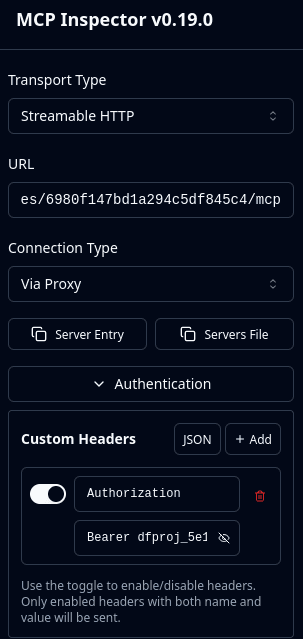
-
Click Connect. A green notification indicates a successful connection.
-
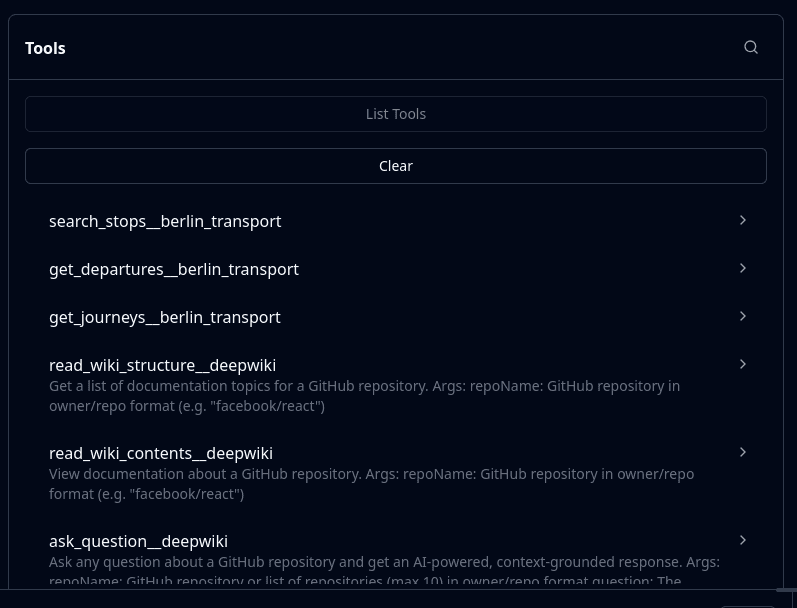
From the toolbar, select Tools and click List Tools. The list of tools appears after a moment.
-
Select a tool and click Run Tool to use it.
Via v1/responses
-
standard connection
-
tool
curl -X POST \ 'http://your-deepfellow-server.com/v1/responses' \ -H 'Authorization: Bearer dfproj_f7a0c4ba-71ae-4129-a4b4-b2da9324634b' \ -H 'Content-Type: application/json' \ -H 'accept: application/json' \ -d '{ "input": "Find me connection between Berlin HBF and airport", "model": "qwen3:8b", "tools": [ { "type": "mcp", "server_label": "Berlin Bus Transport", "server_description": "Searching connections between different bus stations in Berlin.", "server_url": "http://your-deepfellow-server.com/toolboxes/69b97a9d0a101cfacc4282b2/tools/c89f6bdd67924f339911cd5c3d6c222f/mcp", "headers": { "Authorization": "Bearer dfproj_f7a0c4ba-71ae-4129-a4b4-b2da9324634b" }, "require_approval": "never" } ] }' -
toolbox
curl -X POST \
  'http://your-deepfellow-server.com/v1/responses' \
  -H 'Authorization: Bearer dfproj_f7a0c4ba-71ae-4129-a4b4-b2da9324634b' \
  -H 'Content-Type: application/json' \
  -H 'accept: application/json' \
  -d '{
  "input": "Find me connection between Berlin HBF and airport",
  "model": "qwen3:8b",
  "tools": [
    {
      "type": "mcp",
      "server_label": "Berlin Transport",
      "server_description": "Searching connections in Berlin.",
      "server_url": "http://your-deepfellow-server.com/toolboxes/69b97a9d0a101cfacc4282b2/mcp",
      "headers": {
         "Authorization": "Bearer dfproj_f7a0c4ba-71ae-4129-a4b4-b2da9324634b"
      },
      "require_approval": "never"
    }
  ]
}'
-
-
built-in connection
-
tool
curl -X POST \ 'http://your-deepfellow-server.com/v1/responses' \ -H 'Authorization: Bearer dfproj_f7a0c4ba-71ae-4129-a4b4-b2da9324634b' \ -H 'Content-Type: application/json' \ -H 'accept: application/json' \ -d '{ "input": "Find me connection between Berlin HBF and airport", "model": "qwen3:8b", "tools": [ { "type": "mcp", "server_label": "Berlin Bus Transport", "server_description": "Searching connections between different bus stations in Berlin.", "server_url": "df://local/toolboxes/69b97a9d0a101cfacc4282b2/tools/c89f6bdd67924f339911cd5c3d6c222f/mcp", "require_approval": "never" } ] }' -
toolbox
curl -X POST \
  'http://your-deepfellow-server.com/v1/responses' \
  -H 'Authorization: Bearer dfproj_f7a0c4ba-71ae-4129-a4b4-b2da9324634b' \
  -H 'Content-Type: application/json' \
  -H 'accept: application/json' \
  -d '{
  "input": "Find me connection between Berlin HBF and airport",
  "model": "qwen3:8b",
  "tools": [
    {
      "type": "mcp",
      "server_label": "Berlin Transport",
      "server_description": "Searching connections in Berlin.",
      "server_url": "df://local/toolboxes/69b97a9d0a101cfacc4282b2/mcp",
      "require_approval": "never"
    }
  ]
}'
-
Updating Tools and Toolboxes
To update a tool, use POST /toolboxes/{TOOLBOX_ID}/tools/{TOOL_ID} endpoint. It accepts the same schema as the tool creation endpoint, with all fields optional:
curl -X POST \
  'https://your-deepfellow-server.com/toolboxes/{TOOLBOX_ID}/tools/{TOOL_ID}' \
  -H 'Authorization: Bearer DEEPFELLOW_PROJECT_API_KEY' \
  -H 'accept: application/json' \
  -d '{ TOOL_BODY }'
Similarly, to update a toolbox, use POST /toolboxes/{TOOLBOX_ID} endpoint. It accepts the same schema as the toolbox creation endpoint, with all fields optional:
curl -X POST \
  'https://your-deepfellow-server.com/toolboxes/{TOOLBOX_ID}' \
  -H 'Authorization: Bearer DEEPFELLOW_PROJECT_API_KEY' \
  -H 'accept: application/json' \
  -d '{"name": "my-toolbox"}'
Removing Tools and Toolboxes
To remove a tool, use DELETE /toolboxes/{TOOLBOX_ID}/tools/{TOOL_ID} endpoint:
curl -X DELETE \
  'https://your-deepfellow-server.com/toolboxes/{TOOLBOX_ID}/tools/{TOOL_ID}' \
  -H 'Authorization: Bearer DEEPFELLOW_PROJECT_API_KEY' \
  -H 'accept: application/json'
Similarly, to remove a toolbox, use DELETE /toolboxes/{TOOLBOX_ID} endpoint:
curl -X DELETE \
  'https://your-deepfellow-server.com/toolboxes/{TOOLBOX_ID}' \
  -H 'Authorization: Bearer DEEPFELLOW_PROJECT_API_KEY' \
  -H 'accept: application/json'
We use cookies on our website. We use them to ensure proper functioning of the site and, if you agree, for purposes such as analytics, marketing, and targeting ads.